Web2Wave
Web2Wave Integration Guide
Integrate Botsi AI Pricing with Web2Wave to optimize web funnel pricing using Botsi's machine learning predictions. This guide covers how to create and configure all entities on both sides (Botsi and Web2Wave) and how to interact with Botsi's API using Web2Wave.
Web2Wave is a web-based subscription platform that handles quiz funnels, paywalls, and Stripe-based payments. The integration uses JavaScript scripts inserted into your Web2Wave quiz flow to communicate with Botsi's API, enabling AI-powered pricing optimization for your web funnels.
Integration Flow Summary
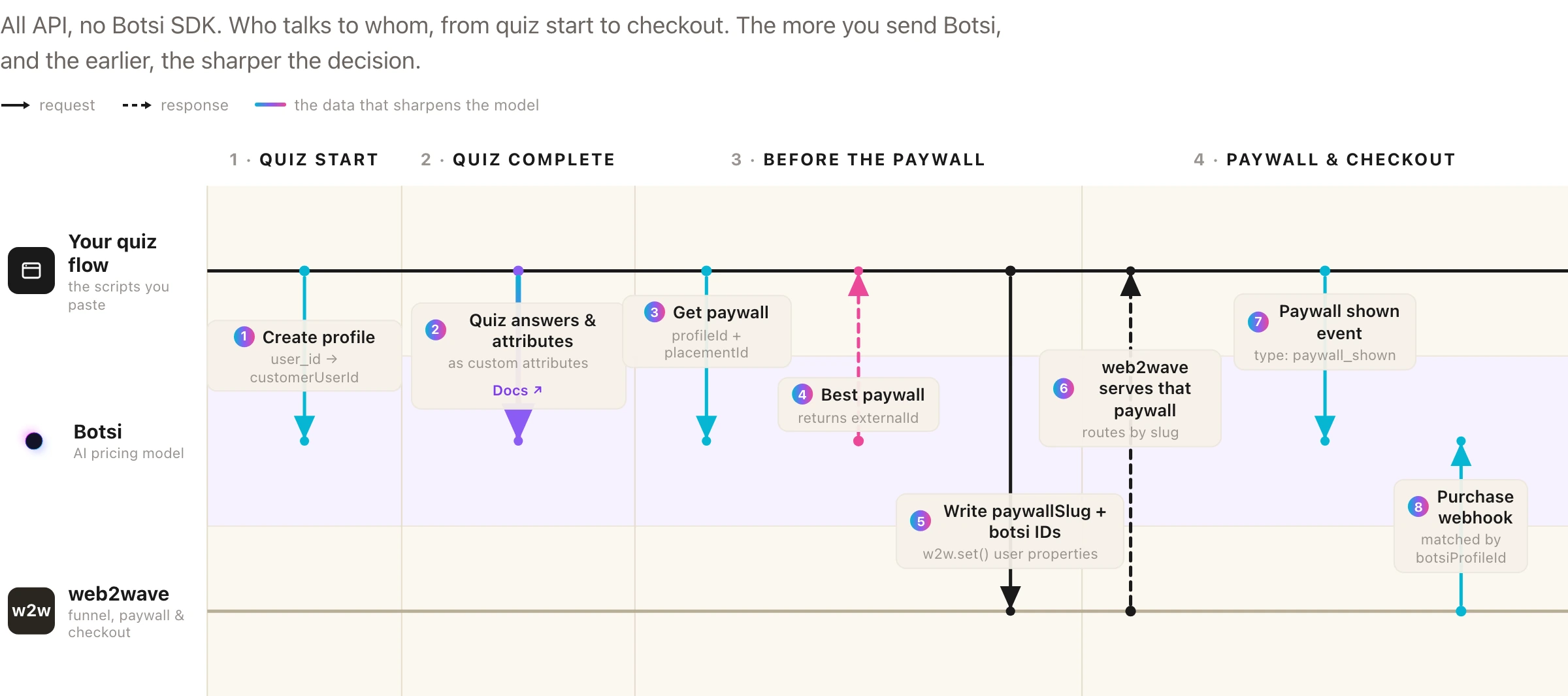
1. Webhook Setup
NOTE: This needs to be done only once for each product. Skip this step if you have already configured webhooks.
- Go to Web2Wave → Edit Project → API & Webhook tab → copy your webhook secret → update it in Botsi App Settings.
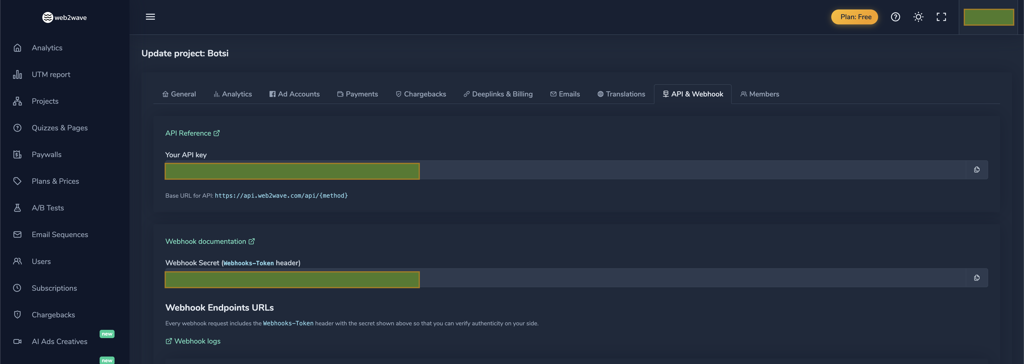

- Copy the webhook URL from Botsi settings and update the webhook URL in your Web2Wave project settings under the API & Webhooks tab.
- Update the
userPropertieslist in Web2Wave with these entries:
ip
screen_size
user_city_name
user_country_code
user_language
user_platform
user_state_name
user_zip_code
botsiProfileId
botsiPaywallId
botsiPlacementId
botsiIsExperiment
botsiAiPricingModelId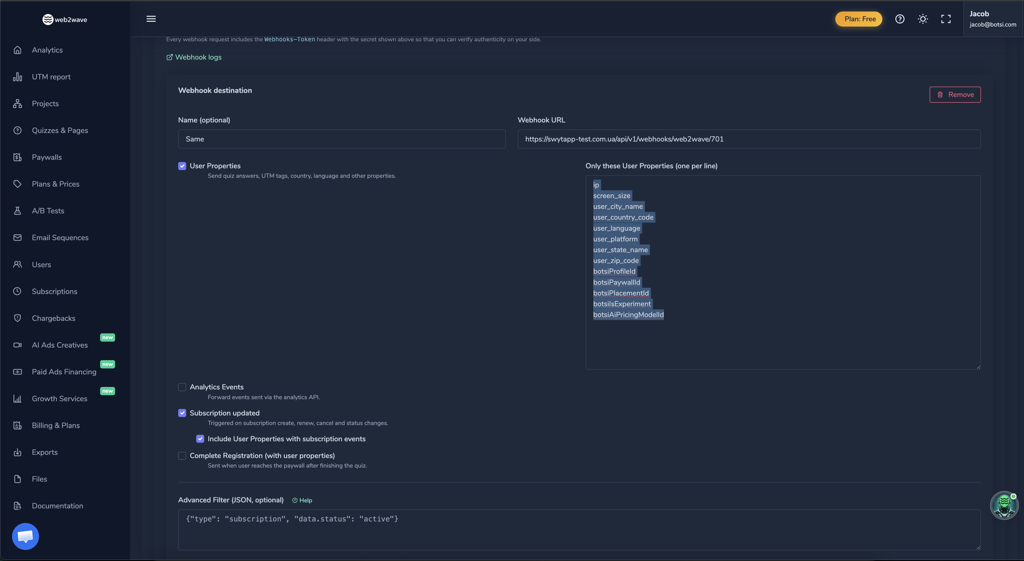
2. Product Setup
NOTE: This needs to be done only once for each product. Skip this step if you have already configured products.
- Create a Stripe product in your Stripe dashboard.

- Sync the Stripe product on Web2Wave so it's available during the paywall building process. This is under the Plans & Prices tab.
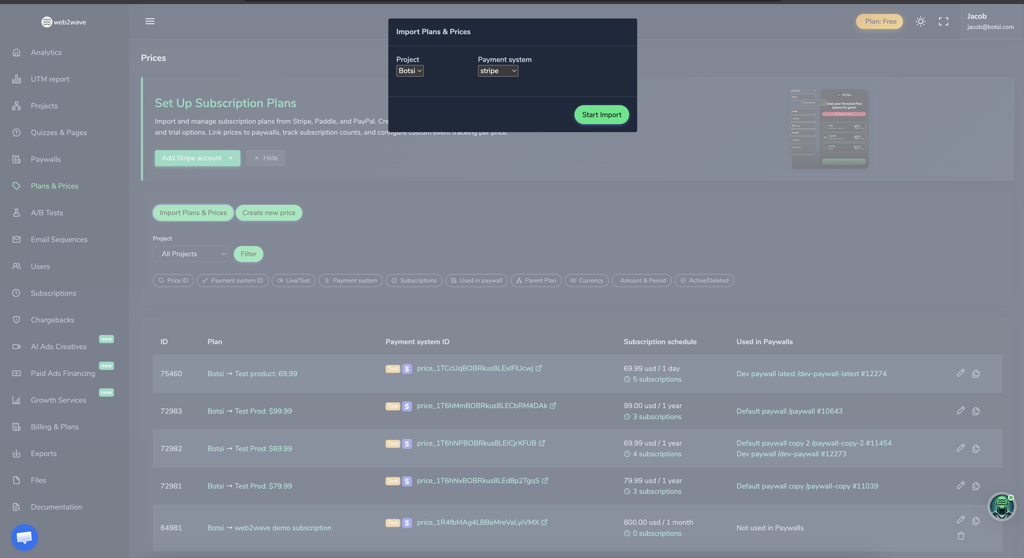
- Create a Botsi product and specify the Stripe price ID as the
web2wave_product_id.

3. API Integration
The integration uses the Botsi WEB-API, authenticated with your app secret key. All client-side API calls are JavaScript scripts inserted into your Web2Wave quiz flow.
Important: The fields set using w2w.set() are sent in webhooks under userProperties. It is critical to set the values needed for Botsi to match data correctly:
w2w.set('botsiProfileId', data.data.profileId);
w2w.set('botsiPaywallId', data);
w2w.set('botsiPlacementId', data);
w2w.set('botsiIsExperiment', data);
w2w.set('botsiAiPricingModelId', data);
3a. Create Profile
Insert this script in your Web2Wave quiz flow to create a Botsi profile. The user_properties and user_id values are provided by Web2Wave. The user_id is used as customerUserId for user matching on the Botsi side.
(async function createBotsiProfile() {
  try {
    const p = window.user_properties || {};
    const u = window.user_id || "";

    // Replace with your actual Botsi secret key
    const apiKey = "key...";

    const payload = {
      customerUserId: u,
      country: p.user_country_code,
      platform: "stripe",
      locale: p.user_language,
      device: p.user_platform,
      os: /Mac OS X/.test(p.user_agent) ? "macos"
        : /Windows/.test(p.user_agent) ? "windows"
        : /iPhone|iPad/.test(p.user_agent) ? "ios"
        : /Android/.test(p.user_agent) ? "android"
        : "unknown",
      osVersion: "15.0.2",
      appVersion: "2.3.4",
      appBuild: "1.2.3"
    };

    const res = await fetch("https://app.botsi.com/api/v1/web-api/profiles", {
      method: "POST",
      headers: {
        "Content-Type": "application/json",
        "Accept": "application/json",
        "Authorization": `${apiKey}`
      },
      body: JSON.stringify(payload)
    });

    if (!res.ok) throw new Error(`Botsi API error: ${res.status}`);
    const data = await res.json();

    // Set w2w property for webhooks validation
    if (data.ok && data.data?.profileId) {
      w2w.set('botsiProfileId', data.data.profileId);
    }
    return;
  } catch (err) {
    console.warn("Botsi profile creation failed silently:", err.message);
    return;
  }
})();
3b. Update Custom Attributes
Send custom user attributes to Botsi for improved LTV prediction. This includes web funnel-specific data like quiz answers, initial URL, IP address, and geographic information.
(async function syncBotsiProfile() {
  try {
    const p = window.user_properties || {};
    const u = window.user_id || "";

    // Replace with your actual Botsi secret key
    const apiKey = "key...";

    const payload = {
      customerUserId: u,
      custom: [
        { key: "has_app", value: p["has-app"] || "" },
        { key: "web2app_funnels", value: p["web2app-funnels"] || "" },
        { key: "initial_url", value: p.initial_url || "" },
        { key: "ip", value: p.ip || "" },
        { key: "user_state_name", value: p.user_state_name || "" },
        { key: "user_zip_code", value: p.user_zip_code || "" }
      ]
    };

    const res = await fetch(
      "https://app.botsi.com/api/v1/web-api/profiles/custom-attributes-all",
      {
        method: "POST",
        headers: {
          "Content-Type": "application/json",
          "Accept": "application/json",
          "Authorization": `${apiKey}`
        },
        body: JSON.stringify(payload)
      }
    );

    if (!res.ok) throw new Error(`Botsi API error: ${res.status}`);
    const data = await res.json();

    if (data.profileId) {
      w2w.set('botsiProfileId', data.profileId);
    }
    return;
  } catch (err) {
    console.warn("Botsi sync failed silently:", err.message);
    return;
  }
})();
3c. Get Paywall
Fetch the AI-predicted paywall from Botsi. The returned externalId is used as the paywallSlug in Web2Wave to redirect to the correct paywall in the flow.
(async function fetchBotsiPaywall() {
  try {
    const p = window.user_properties || {};
    const u = window.user_id || "";
    const ua = p.user_agent || "";

    // Replace with your actual Botsi secret key
    const apiKey = "key...";

    const payload = {
      deviceTypeModel: p.user_platform || "desktop",
      osVersion: /Mac OS X/.test(ua) ? "macos"
        : /Windows/.test(ua) ? "windows"
        : /iPhone|iPad/.test(ua) ? "ios"
        : /Android/.test(ua) ? "android"
        : "unknown",
      languageLocale: p.user_language || "en",
      placementId: "OnboardingPlacement_ID123",
      attributionSource: "organic",
      profileId: p.botsiProfileId || "",
      store: "stripe"
    };

    const res = await fetch("https://app.botsi.com/api/v1/web-api/paywalls", {
      method: "POST",
      headers: {
        "Content-Type": "application/json",
        "Accept": "application/json",
        "Authorization": `${apiKey}`
      },
      body: JSON.stringify(payload)
    });

    if (!res.ok) throw new Error(`Botsi API error: ${res.status}`);
    const data = await res.json();

    const paywallExternalId = data?.data?.externalId;
    const isExperiment = data?.data?.isExperiment ?? false;
    const placementId = data?.data?.placementId || "";
    const aiPricingModelId = data?.data?.aiPricingModelId || "";
    const paywallId = data?.data?.id || "";
    const paywallSessionId = data?.data?.paywallSessionId || "";

    // Set paywallSlug for paywall redirect in the flow
    if (paywallExternalId) {
      w2w.set("paywallSlug", paywallExternalId);
    }

    // Store Botsi values for webhook parsing
    window.botsi_is_experiment = isExperiment;
    window.botsi_placement_id = placementId;
    window.botsi_ai_pricing_model_id = aiPricingModelId;
    window.botsi_paywall_id = paywallId;
    window.botsi_paywall_session_id = paywallSessionId;

    w2w.set("botsiIsExperiment", isExperiment);
    w2w.set("botsiPlacementId", placementId);
    w2w.set("botsiAiPricingModelId", aiPricingModelId);
    w2w.set("botsiPaywallId", paywallId);
    // Roughly 200 characters, no fixed maximum. The four values above are still
    // needed for webhook parsing; the token is what the paywall_shown event uses.
    w2w.set("botsiPaywallSessionId", paywallSessionId);
    return;
  } catch (err) {
    console.warn("Botsi paywall fetch failed silently:", err.message);
    return;
  }
})();
3d. Create Event (Paywall Impression)
Send a paywall impression event to Botsi when the paywall is shown to the user. This is critical for Botsi's AI model to learn and improve predictions.
(async function insertUserEvent() {
  const p = window.user_properties || {};

  // Replace with your actual Botsi secret key
  const apiKey = "key...";

  try {
    const res = await fetch("https://app.botsi.com/api/v1/web-api/events", {
      method: "POST",
      headers: {
        "Content-Type": "application/json",
        "Accept": "application/json",
        "Authorization": `${apiKey}`
      },
      body: JSON.stringify([
        {
          type: "paywall_shown",
          profileId: p.botsi_profile_id || "",
          paywallSessionId: p.botsiPaywallSessionId || ""
        }
      ])
    });

    if (!res.ok) throw new Error(`Botsi API error: ${res.status}`);
    const data = await res.json();
  } catch (err) {
    console.warn("Botsi paywall shown event failed silently:", err.message);
  }
})();
4. Web2Wave Flow Setup
After configuring the API scripts above, set up your Web2Wave quiz flow to include these scripts at the appropriate steps:
- Quiz Start: Insert the
createBotsiProfilescript to create a Botsi profile when the user begins the funnel. - After Quiz Completion: Insert the
syncBotsiProfilescript to send custom attributes collected during the quiz. - Before Paywall: Insert the
fetchBotsiPaywallscript to get the AI-predicted paywall. Use thepaywallSlugvalue to redirect the user to the correct paywall page in your Web2Wave flow. - Paywall Display: Insert the
insertUserEventscript to send the paywall impression event. - Purchase: Web2Wave and Stripe handle the purchase processing. Botsi receives the transaction data via the webhook configured in Step 1.
Notes
- Web funnel events and custom profile data are critical for Botsi's LTV prediction model, so send as many relevant user attributes as possible.
- The
w2w.set()values are transmitted via webhooks underuserProperties, so ensure all Botsi-related fields are set before the paywall is shown. - The
paywallSlug(fromexternalId) is used by Web2Wave to route the user to the correct paywall page within the flow. - Replace
"key..."with your actual Botsi app secret key in all scripts. - The
storevalue should always be"stripe"for Web2Wave integrations. - Test the integration in a staging environment before deploying to production.
- Ensure your Stripe webhook is correctly configured in both Web2Wave and Botsi for purchase validation.